Can I run ZLT on multiple computers, for example, my desktop and laptop?
Where will my orders be held, my local computer, broker server or exchange
server?
Why is the software
named ZeroLine Trader?
The name ZeroLine Trader is from the nick name "ZL Trader"
that the developer uses when learning and trading in
WoodiesCCIClub
chat room. The developer chooses the nick name to remind himself to take
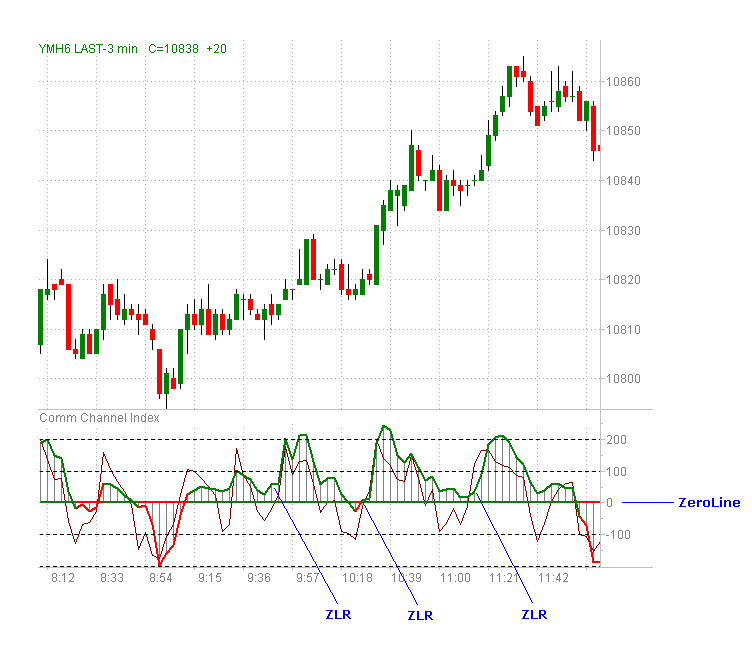
only trades triggered by the with trend ZLR CCI pattern.
Three ZLR CCI patterns are marked in the following chart of YM 2006 March
contract on December 9, 2005.
The ZLT license is per machine based. Before we can generate and email you the license, we need the file HardwareID.txt. There are detail instructions at www.zerolinetrader.com/subscribed on how to find the file.
To renew the ZLT license, just make the subscription payment and email the file HardwareID.txt as usual. We keep record of your subscription information. Your license will be extended based on your license expiration date or the payment date, whichever is later. So please renew the license several days earlier than the expiration date to avoid the interruption of your usage of the software.
Yes. With one subscription, you can have multiple ZLT licenses to run ZLT on multiple computers, but we require the same Windows user names on different computers. When you subscribe, just follow the instructions to email us the multiple Hardware ID files from different computers. The Hardware ID file contains your OS user name and the hardware ID string.
Or you can always buy additional subscriptions.
Or you can easily create new user accounts to have the same user name. To create new user name on XP, click Start->Control Panel. Then select User Accounts.
Note: Renaming an existing user account does NOT work for this purpose. Please create new user accounts.
In Data->Instruments ..., make sure the instrument is connected. If not, just right click on the instrument line and select Connect.
No, you don't. Just use the latest TWS from IB. The API is built in with ZLT. Our experience is the ZLT usually works with TWS with newer API. It really depends on the nature of the API changes. However, to be on the safe side, we will always promptly build and deliver ZLT built with the latest API.
The order can be held at three different places: exchange server, IB server, or your computer.
It depends on the order type and the exchange.
For ZLT, any order type starting with 'Z', such as ZSTP, ZSTPLMT, and RATIO_LMT/RAITO_MKT are held on your local computer.
All the other order types are either at IB server or exchange server. You can find more information on IB's web site.
Here is an example of GLOBEX:
http://www.interactivebrokers.com/e...x&ib_entity=llc
It shows STPLMT and LMT orders to GLOBEX are held on the exchange server. But STP order to GLOBEX are held on IB Server.
ZLT matches the stop loss and profit target orders with proper order quantity and OCA (One Cancel All) strings. So the stop loss and profit target orders will cancel each other through the OCA strings once one of them is filled. The OCA mechanism works even when your Internet connection is lost.
ZLT is available for Windows 7, XP and Vista; Mac OS and Linux (Ubuntu).
Yes. ZeroLine Trader is a multi-threaded software which handles multiple tasks simultaneously and it will take advantage of those technologies.
©2003-2008 ZeroLineTrader.com All Rights Reserved